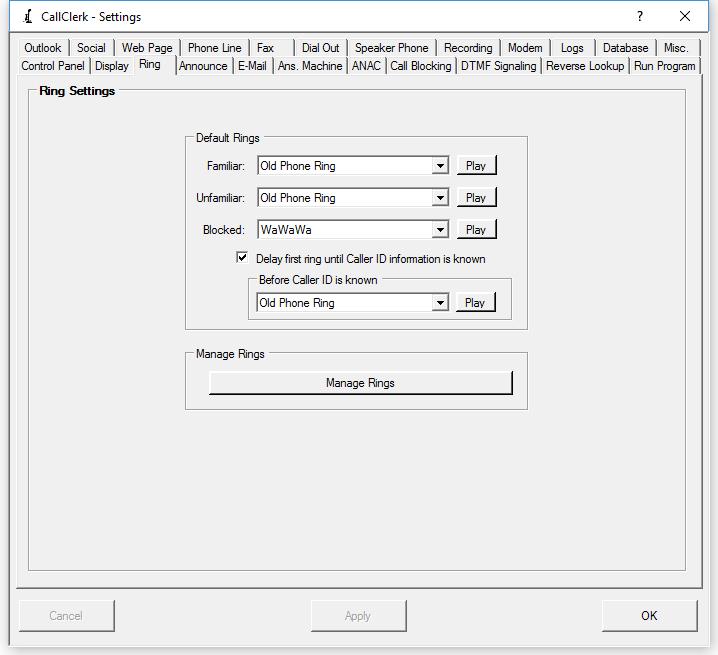
CallClerk - Settings Ring Window
The CallClerk - Settings - Ring window lets you set the rings to be heard though your PC speakers when a call is received.Rings can be set for each of Familiar, Unfamiliar and Blocked Callers. Additional a unique ring can be set for use while the caller id number is not yet known.
New Rings can be added (renamed and deleted) by clicking the [Manage Rings] button - this brings up the CallClerk Manage Rings window.
An option to delay the first ring until Caller ID information is known is also available; when checked the ring will not be played until the caller id information has been received and CallClerk can determine if the call is from a familiar, unfamiliar or blocked caller. In this way you can, for example, setup CallClerk to never play a ring sound for a blocked call.
Note: CallClerk cannot surpress the ring sound made by any phones you may have on the line.
Click any of the [Play] buttons to play the sound of the ringing through your PC speakers.
Once the current settings have been modified the changes may be permanently applied by clicking on the [Apply] or [OK] button or voided by clicking on the [Cancel] button. If either the [OK] or [Cancel] button is pressed then the CallClerk - Settings window will be hidden.
Here is what the CallClerk - Settings - Ring window looks like: